Joining a FT Blood Run on CAFE (Crystal DC)
-
Check the Schedule: Look in
#ft-schedulefor scheduled runs, the run type, and the raid lead. Be sure to read the run notes.
Forked Tower Raid leads in CAFE can use role-based internal signups with either the CAFE exclusive Roster Manager or with External Sign-up systems (like Excel or Sheets). The signup method is determined by the raid lead and will be specified in the run announcement. Please read each run announcement carefully to understand which method is being used for the run you want to join.

TL;DR
Check #ft-schedule, Sign up for a run, wait for the password ping 30 minutes before start time, and use it to join the Raid in the Private Tab of the in-game Party Finder.
How to Sign Up:
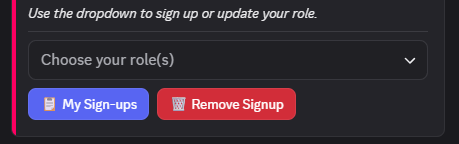
-
Use the dropdown in the thread to select your your preferred class. You can choose more than one role to increase your chances of getting in.
-
Once you submit your role selection, the bot will request more information depending on which run you signed up for. This step is optional but highly recommended as it will help the raid lead with party distribution.
-
If you signed up for Forked Tower you can review and update your phantom jobs. You can also do this with the
/forked-preferencesat anytime and click
-
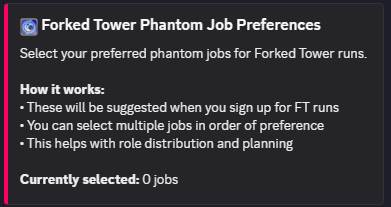
After signing up, you can check your status in the run thread or click  button. This will show all of your current signups, your role selections, and your party assignment once it’s distributed.
Role Selection Tips:
-
✅ Select all roles you can play
-
✅ Update your preferences often
-
✅ Come prepared and geared for the run
-
❌ Don’t select roles you’re not comfortable performing as you might be asked to do it.
-
❌ Don’t sign up for multiple runs at the same time.
Remember: Always follow the raid lead’s instructions and check run-specific notes!
